QuantCalc vs RetirePro vs Adviser.best: 2026 FIRE Calcs
This page describes how three early-retirement planning tools differ on the features each vendor documents publicly. It is not a ranking and contains no opinion about any third-party tool. We make QuantCalc. RetirePro is a third-party product, and every statement about it below is as published on retirepro.io, checked 2026-09-07. Adviser.best's website could not be reached on 2026-09-07, so this page makes no statements about it. The wider eight-tool comparison is on our retirement calculator comparison page.
Why these features: for an early retiree, ACA premium tax credits, the two-year IRMAA lookback and Roth conversion timing all depend on the same taxable-income number, and a Monte Carlo simulation shows whether the resulting plan survives poor return sequences. The table records which of these each vendor documents.
Documented Features at a Glance

Run your own numbers — FREE
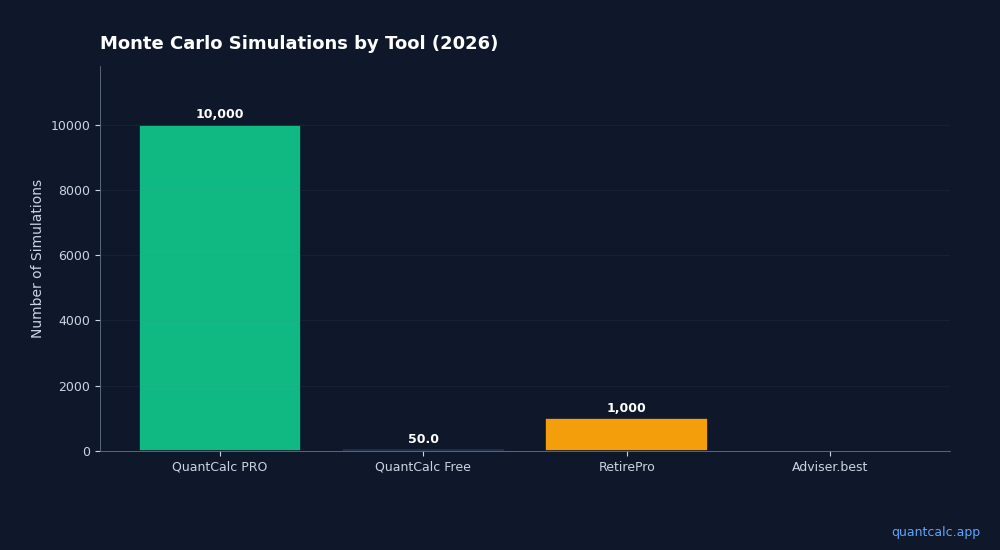
Free: 3 runs a day at 100 Monte Carlo simulations each (10,000 per run with PRO). Forward-looking forecasts from BlackRock, JPMorgan, Vanguard, GMO, Schwab, Invesco. No account needed.
Try QuantCalc Free →How to read this table. The RetirePro column records what retirepro.io stated on 2026-09-07; “Not documented” means we did not find the capability described on that page — not that it is absent. Adviser.best is omitted from the table because no public page was reachable on that date. Corrections are welcome at [email protected].
| Feature | QuantCalc (ours) | RetirePro (per vendor) |
|---|---|---|
| Monte Carlo simulation | 10,000 sims (PRO) / 100 (free) | Summary only (Free); Full, 1,000 scenarios (Pro, Premium) |
| ACA premium tax credits | MAGI modeling, 400% FPL cliff detection, subsidy amounts | Not documented |
| IRMAA | Yes (2-year lookback) | Not documented |
| Roth conversion analysis | Integrated with ACA + IRMAA | Roth conversions listed among tax strategies |
| Federal and state tax | Federal + 51 jurisdictions | Federal + state brackets |
| Portfolio optimizer | Yes (mean-variance) | Not documented |
| Glide path modeling | Yes (multi-period allocation shifts) | Not documented |
| Forward-looking forecasts | 6 sources (BlackRock, J.P. Morgan, Vanguard, GMO, Schwab, Invesco) | Not documented |
| Social Security | Yes | Yes (claim-age optimizer) |
| Report export | PDF (PRO) | HTML (Pro) / PDF (Premium) |
| Plans | Free / Personal PRO ($49 one-time) | Free / Pro / Premium — see the vendor's pricing page |
Run your own numbers in the free calculator →
RetirePro (retirepro.io)
Statements in this section are as published on retirepro.io, checked 2026-09-07.
RetirePro's site describes Monte Carlo analysis as “Summary only” in the Free tier and “Full (1,000 scenarios)” in Pro and Premium, federal and state tax brackets, RMDs, capital gains and Social Security taxation, tax-aware withdrawals and projections, a Social Security claim-age optimizer, and Roth conversions among its tax strategies. It states “No signup required to start” and that your data stays in your browser. The site lists Free, Pro and Premium tiers, with HTML reports under Pro and PDF reports under Premium; amounts are on the vendor's page.
Documented by the vendor:
- Monte Carlo: Summary only (Free); Full, 1,000 scenarios (Pro and Premium)
- Federal and state tax brackets; RMD, capital-gains and Social Security taxation
- Social Security claim-age optimizer; Roth conversions
- No signup required to start; data stays on your device
Adviser.best
We attempted to load adviser.best and www.adviser.best on 2026-09-07 and neither host resolved, and a web search returned no public page for the product. Because we make no statements about a product we cannot verify on the vendor's own pages, this page does not describe Adviser.best's features. If the vendor publishes a public page, corrections are welcome at [email protected].
QuantCalc (quantcalc.app)
Made by us. The statements below describe what QuantCalc does today; the full model is documented on the methodology page.
QuantCalc combines Monte Carlo simulation with IRMAA (with its two-year lookback) and Roth conversion analysis in one simulation; with Marketplace (ACA) coverage before Medicare turned on, the simulation also prices ACA premium tax credits, while the free ACA calculator prices one year and the ACA Bridge Planner sets a conversion amount for each pre-Medicare year. The free tier runs 100 simulations per run across the full retirement timeline. Personal PRO ($49 one-time) raises each run to 10,000 simulations and adds the portfolio optimizer, forward-looking forecast comparisons from six published sources, and PDF report export.
Where each piece is computed:
When you model a Roth conversion in QuantCalc:
- The Monte Carlo planner runs the conversion (fixed amount or bracket fill) through every simulated path, with federal and state tax, IRMAA two years later and portfolio longevity
- The ACA Bridge Planner (in the Roth Conversion Planner) sets each pre-Medicare year's conversion against the 400% FPL line and shows the premium tax credit it keeps and the IRMAA tier it sets two years later, on one deterministic path
- The free ACA calculator prices one year's premium tax credit at a MAGI you enter
The conversion amount that looks best on income tax alone can push MAGI past the 400% FPL threshold and change the premium tax credit by more than the tax saved. The Monte Carlo run prices the premium tax credit when Marketplace (ACA) coverage before Medicare is turned on, but it does not size a conversion to the cliff; the ACA Bridge Planner does that.
Scope notes:
QuantCalc does not have a dedicated backdoor Roth calculator. The free tier is limited to 100 simulations per run (3 runs per day), which gives a directional answer; the 10,000-simulation PRO run narrows the 95% band around the success rate to roughly one percentage point.
How to Use This Page
If you want a quick Monte Carlo check without creating an account, RetirePro's site states that no signup is required to start; its Monte Carlo analysis is listed as Summary only in Free and Full (1,000 scenarios) in Pro and Premium.
If Roth conversions, ACA premium tax credits and IRMAA all apply to you, QuantCalc computes the conversion tax and IRMAA in one simulation and the premium tax credit in its ACA tools; the free tier includes the full tax-aware engine at 100 simulations per run.
Whichever tool you use, verify the vendor's current feature list and pricing on its own site before relying on it. Tax, healthcare and investment decisions in early retirement are interconnected, and a plan is only as good as the assumptions and rules a tool applies to them.
Related reading:
- Retirement calculators compared on documented features (8 tools)
- The ACA Subsidy Cliff Is Back in 2026
- ACA Subsidy Repayment: Why There's No Cap Above 400% FPL
- How Much Money Do You Actually Need to Retire Early in 2026?
QuantCalc is an independent educational tool. Not affiliated with, endorsed by, or sponsored by RetirePro, Adviser.best, or any referenced firm. All trademarks belong to their respective owners. Third-party product statements are as published by the vendor on the date noted and may change. Not financial advice.